Decompiling
When modding Beat Saber and creating hooks to change certain behaviour, it's important to be able to read the game's code itself. There are some tools to help with this.
This page is extremely similar to its PC version. This is because the game is cross buy - if you own the Quest version, you can sign in to the Meta Quest Link PC app with the same Meta account and click the "Get" button on Beat Saber's store page to download it.
It's highly recommended to download the PC version, as the contents of methods for the Quest version cannot be decompiled. Aside from the few places the game interacts with the headset directly, almost all the code is the same across versions, so decompiling the PC game is still just as useful.
Tools
ILSpy
ILSpy is a lightweight decompiler for C# dlls which will allow you to freely browse the different types, variables, and methods that are contained within the game's own dlls. Grab the installer from the releases and install ILSpy.
Once you have ILSpy opened, find the Manage Assembly Lists icon in the top bar and create a new list. You can name it after the Beat Saber version you are working on. Once created, double click it to open the list.
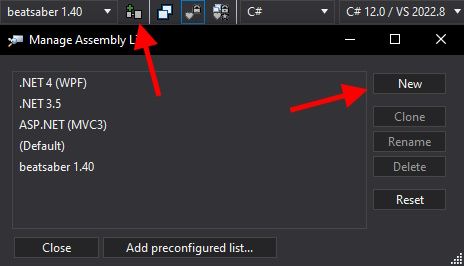
To add binaries, click the Open icon in the top bar and navigate to the game folder of your PC install. Select everything in the /Beat Saber_Data/Managed folder and open them into ILSpy. This will also include the .NET framework and Unity assemblies, so that when you are looking at types from Beat Saber, all of the references will be resolved.
dnSpy
dnSpy is a much more in-depth tool for developing .NET programs; it has a debugger, assembly editor, and more. It also has a decompiler built in to it for browsing decompiled C#, just like ILSpy.
You can get dnSpy from the releases on GitHub. Extract the zip archive and run the .exe to get started. Similarly to ILSpy, you create a new list by going to File, then Open List..., and adding a new list. You can name it after the Beat Saber version you are working on. Once created, double click it to open the list.
Click the Open icon in the top bar or press Ctrl+O and navigate to Beat Saber/Beat Saber_Data/Managed, select everything in this folder and open them into your list. To start searching, click the Search Assemblies in the top bar.
Browsing the Code
Beat Saber is a complex game with a lot of different assemblies, but it is pretty well organized and you can expect to find what you are looking for where it should be. Something that may help is to find an object in game using RUE, and by checking the MonoBehaviours attached to them, you can search for them in ILSpy.
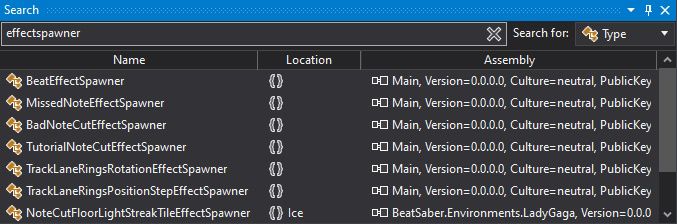
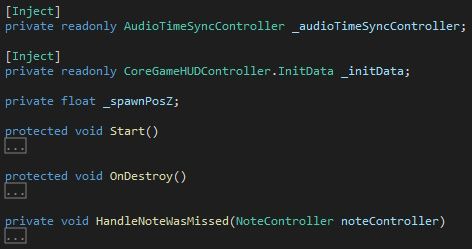
If you double click a type in the search window, or in the assembly list, you will see the decompiler's interpretation of that type and the corresponding C# code.
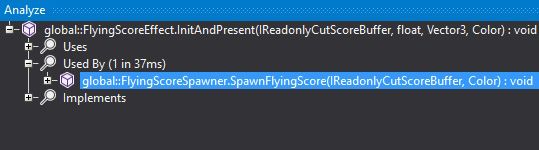
An important trick to know is analyzing members of a type. By pressing Ctrl+R or right-clicking and selecting Analyze on, for example, a public method, you will see the usages of that member. In the example below, the method FlyingScoreEffect.InitAndPresent is called by FlyingScoreSpawner.SpawnFlyingScore.